> ## Documentation Index
> Fetch the complete documentation index at: https://langchain-5e9cc07a-preview-update-1770920925-e15dbde.mintlify.site/llms.txt
> Use this file to discover all available pages before exploring further.
# Subgraphs
This guide explains the mechanics of using subgraphs. A subgraph is a [graph](/oss/javascript/langgraph/graph-api#graphs) that is used as a [node](/oss/javascript/langgraph/graph-api#nodes) in another graph.
Subgraphs are useful for:
* Building [multi-agent systems](/oss/javascript/langchain/multi-agent)
* Re-using a set of nodes in multiple graphs
* Distributing development: when you want different teams to work on different parts of the graph independently, you can define each part as a subgraph, and as long as the subgraph interface (the input and output schemas) is respected, the parent graph can be built without knowing any details of the subgraph
When adding subgraphs, you need to define how the parent graph and the subgraph communicate:
* [Invoke a graph from a node](#invoke-a-graph-from-a-node) — subgraphs are called from inside a node in the parent graph
* [Add a graph as a node](#add-a-graph-as-a-node) — a subgraph is added directly as a node in the parent and **shares [state keys](/oss/javascript/langgraph/graph-api#state)** with the parent
## Setup
```bash theme={null}
npm install @langchain/langgraph
```
**Set up LangSmith for LangGraph development**
Sign up for [LangSmith](https://smith.langchain.com) to quickly spot issues and improve the performance of your LangGraph projects. LangSmith lets you use trace data to debug, test, and monitor your LLM apps built with LangGraph — read more about how to get started [here](https://docs.smith.langchain.com).
## Invoke a graph from a node
A simple way to implement a subgraph is to invoke a graph from inside the node of another graph. In this case subgraphs can have **completely different schemas** from the parent graph (no shared keys). For example, you might want to keep a private message history for each of the agents in a [multi-agent](/oss/javascript/langchain/multi-agent) system.
If that's the case for your application, you need to define a node **function that invokes the subgraph**. This function needs to transform the input (parent) state to the subgraph state before invoking the subgraph, and transform the results back to the parent state before returning the state update from the node.
```typescript theme={null}
import { StateGraph, StateSchema, START } from "@langchain/langgraph";
import * as z from "zod";
const SubgraphState = new StateSchema({
bar: z.string(),
});
// Subgraph
const subgraphBuilder = new StateGraph(SubgraphState)
.addNode("subgraphNode1", (state) => {
return { bar: "hi! " + state.bar };
})
.addEdge(START, "subgraphNode1");
const subgraph = subgraphBuilder.compile();
// Parent graph
const State = new StateSchema({
foo: z.string(),
});
// Transform the state to the subgraph state and back
const builder = new StateGraph(State)
.addNode("node1", async (state) => {
const subgraphOutput = await subgraph.invoke({ bar: state.foo });
return { foo: subgraphOutput.bar };
})
.addEdge(START, "node1");
const graph = builder.compile();
```
```typescript theme={null}
import { StateGraph, StateSchema, START } from "@langchain/langgraph";
import * as z from "zod";
// Define subgraph
const SubgraphState = new StateSchema({
// note that none of these keys are shared with the parent graph state
bar: z.string(),
baz: z.string(),
});
const subgraphBuilder = new StateGraph(SubgraphState)
.addNode("subgraphNode1", (state) => {
return { baz: "baz" };
})
.addNode("subgraphNode2", (state) => {
return { bar: state.bar + state.baz };
})
.addEdge(START, "subgraphNode1")
.addEdge("subgraphNode1", "subgraphNode2");
const subgraph = subgraphBuilder.compile();
// Define parent graph
const ParentState = new StateSchema({
foo: z.string(),
});
const builder = new StateGraph(ParentState)
.addNode("node1", (state) => {
return { foo: "hi! " + state.foo };
})
.addNode("node2", async (state) => {
const response = await subgraph.invoke({ bar: state.foo }); // [!code highlight]
return { foo: response.bar }; // [!code highlight]
})
.addEdge(START, "node1")
.addEdge("node1", "node2");
const graph = builder.compile();
for await (const chunk of await graph.stream(
{ foo: "foo" },
{ subgraphs: true }
)) {
console.log(chunk);
}
```
1. Transform the state to the subgraph state
2. Transform response back to the parent state
```
[[], { node1: { foo: 'hi! foo' } }]
[['node2:9c36dd0f-151a-cb42-cbad-fa2f851f9ab7'], { subgraphNode1: { baz: 'baz' } }]
[['node2:9c36dd0f-151a-cb42-cbad-fa2f851f9ab7'], { subgraphNode2: { bar: 'hi! foobaz' } }]
[[], { node2: { foo: 'hi! foobaz' } }]
```
This is an example with two levels of subgraphs: parent -> child -> grandchild.
```typescript theme={null}
import { StateGraph, StateSchema, START, END } from "@langchain/langgraph";
import * as z from "zod";
// Grandchild graph
const GrandChildState = new StateSchema({
myGrandchildKey: z.string(),
});
const grandchild = new StateGraph(GrandChildState)
.addNode("grandchild1", (state) => {
// NOTE: child or parent keys will not be accessible here
return { myGrandchildKey: state.myGrandchildKey + ", how are you" };
})
.addEdge(START, "grandchild1")
.addEdge("grandchild1", END);
const grandchildGraph = grandchild.compile();
// Child graph
const ChildState = new StateSchema({
myChildKey: z.string(),
});
const child = new StateGraph(ChildState)
.addNode("child1", async (state) => {
// NOTE: parent or grandchild keys won't be accessible here
const grandchildGraphInput = { myGrandchildKey: state.myChildKey }; // [!code highlight]
const grandchildGraphOutput = await grandchildGraph.invoke(grandchildGraphInput);
return { myChildKey: grandchildGraphOutput.myGrandchildKey + " today?" }; // [!code highlight]
}) // [!code highlight]
.addEdge(START, "child1")
.addEdge("child1", END);
const childGraph = child.compile();
// Parent graph
const ParentState = new StateSchema({
myKey: z.string(),
});
const parent = new StateGraph(ParentState)
.addNode("parent1", (state) => {
// NOTE: child or grandchild keys won't be accessible here
return { myKey: "hi " + state.myKey };
})
.addNode("child", async (state) => {
const childGraphInput = { myChildKey: state.myKey }; // [!code highlight]
const childGraphOutput = await childGraph.invoke(childGraphInput);
return { myKey: childGraphOutput.myChildKey }; // [!code highlight]
}) // [!code highlight]
.addNode("parent2", (state) => {
return { myKey: state.myKey + " bye!" };
})
.addEdge(START, "parent1")
.addEdge("parent1", "child")
.addEdge("child", "parent2")
.addEdge("parent2", END);
const parentGraph = parent.compile();
for await (const chunk of await parentGraph.stream(
{ myKey: "Bob" },
{ subgraphs: true }
)) {
console.log(chunk);
}
```
1. We're transforming the state from the child state channels (`myChildKey`) to the grandchild state channels (`myGrandchildKey`)
2. We're transforming the state from the grandchild state channels (`myGrandchildKey`) back to the child state channels (`myChildKey`)
3. We're passing a function here instead of just compiled graph (`grandchildGraph`)
4. We're transforming the state from the parent state channels (`myKey`) to the child state channels (`myChildKey`)
5. We're transforming the state from the child state channels (`myChildKey`) back to the parent state channels (`myKey`)
6. We're passing a function here instead of just a compiled graph (`childGraph`)
```
[[], { parent1: { myKey: 'hi Bob' } }]
[['child:2e26e9ce-602f-862c-aa66-1ea5a4655e3b', 'child1:781bb3b1-3971-84ce-810b-acf819a03f9c'], { grandchild1: { myGrandchildKey: 'hi Bob, how are you' } }]
[['child:2e26e9ce-602f-862c-aa66-1ea5a4655e3b'], { child1: { myChildKey: 'hi Bob, how are you today?' } }]
[[], { child: { myKey: 'hi Bob, how are you today?' } }]
[[], { parent2: { myKey: 'hi Bob, how are you today? bye!' } }]
```
## Add a graph as a node
When the parent graph and subgraph can communicate over a shared state key (channel) in the [schema](/oss/javascript/langgraph/graph-api#state), you can add a graph as a [node](/oss/javascript/langgraph/graph-api#nodes) in another graph. For example, in [multi-agent](/oss/javascript/langchain/multi-agent) systems, the agents often communicate over a shared [messages](/oss/javascript/langgraph/graph-api#why-use-messages) key.
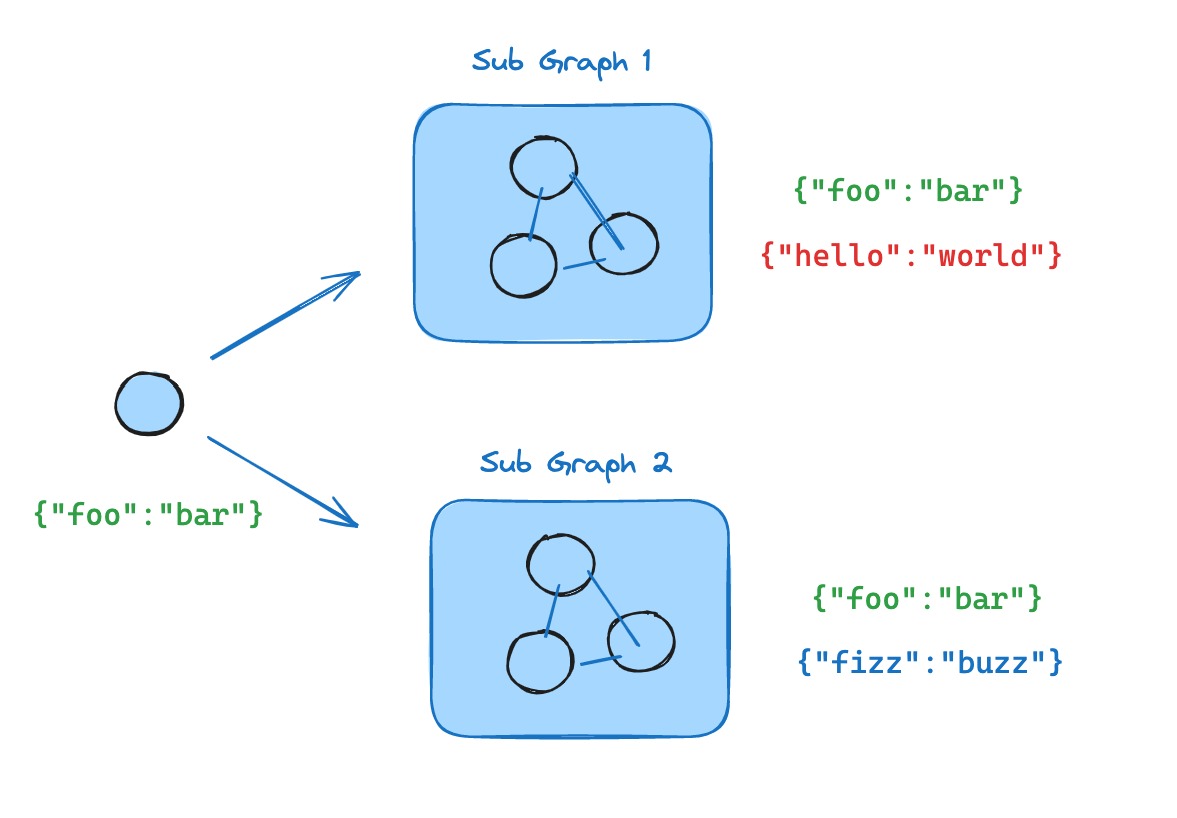 If your subgraph shares state keys with the parent graph, you can follow these steps to add it to your graph:
1. Define the subgraph workflow (`subgraphBuilder` in the example below) and compile it
2. Pass compiled subgraph to the `.addNode` method when defining the parent graph workflow
```typescript theme={null}
import { StateGraph, StateSchema, START } from "@langchain/langgraph";
import * as z from "zod";
const State = new StateSchema({
foo: z.string(),
});
// Subgraph
const subgraphBuilder = new StateGraph(State)
.addNode("subgraphNode1", (state) => {
return { foo: "hi! " + state.foo };
})
.addEdge(START, "subgraphNode1");
const subgraph = subgraphBuilder.compile();
// Parent graph
const builder = new StateGraph(State)
.addNode("node1", subgraph)
.addEdge(START, "node1");
const graph = builder.compile();
```
```typescript theme={null}
import { StateGraph, StateSchema, START } from "@langchain/langgraph";
import * as z from "zod";
// Define subgraph
const SubgraphState = new StateSchema({
foo: z.string(), // [!code highlight]
bar: z.string(), // [!code highlight]
});
const subgraphBuilder = new StateGraph(SubgraphState)
.addNode("subgraphNode1", (state) => {
return { bar: "bar" };
})
.addNode("subgraphNode2", (state) => {
// note that this node is using a state key ('bar') that is only available in the subgraph
// and is sending update on the shared state key ('foo')
return { foo: state.foo + state.bar };
})
.addEdge(START, "subgraphNode1")
.addEdge("subgraphNode1", "subgraphNode2");
const subgraph = subgraphBuilder.compile();
// Define parent graph
const ParentState = new StateSchema({
foo: z.string(),
});
const builder = new StateGraph(ParentState)
.addNode("node1", (state) => {
return { foo: "hi! " + state.foo };
})
.addNode("node2", subgraph)
.addEdge(START, "node1")
.addEdge("node1", "node2");
const graph = builder.compile();
for await (const chunk of await graph.stream({ foo: "foo" })) {
console.log(chunk);
}
```
1. This key is shared with the parent graph state
2. This key is private to the `SubgraphState` and is not visible to the parent graph
```
{ node1: { foo: 'hi! foo' } }
{ node2: { foo: 'hi! foobar' } }
```
## Add persistence
You only need to **provide the checkpointer when compiling the parent graph**. LangGraph will automatically propagate the checkpointer to the child subgraphs.
```typescript theme={null}
import { StateGraph, StateSchema, START, MemorySaver } from "@langchain/langgraph";
import * as z from "zod";
const State = new StateSchema({
foo: z.string(),
});
// Subgraph
const subgraphBuilder = new StateGraph(State)
.addNode("subgraphNode1", (state) => {
return { foo: state.foo + "bar" };
})
.addEdge(START, "subgraphNode1");
const subgraph = subgraphBuilder.compile();
// Parent graph
const builder = new StateGraph(State)
.addNode("node1", subgraph)
.addEdge(START, "node1");
const checkpointer = new MemorySaver();
const graph = builder.compile({ checkpointer });
```
If you want the subgraph to **have its own memory**, you can compile it with the appropriate checkpointer option. This is useful in [multi-agent](/oss/javascript/langchain/multi-agent) systems, if you want agents to keep track of their internal message histories:
```typescript theme={null}
const subgraphBuilder = new StateGraph(...)
const subgraph = subgraphBuilder.compile({ checkpointer: true });
```
## View subgraph state
When you enable [persistence](/oss/javascript/langgraph/persistence), you can [inspect the graph state](/oss/javascript/langgraph/persistence#checkpoints) (checkpoint) via the appropriate method. To view the subgraph state, you can use the subgraphs option.
You can inspect the graph state via `graph.getState(config)`. To view the subgraph state, you can use `graph.getState(config, { subgraphs: true })`.
**Available **only** when interrupted**
Subgraph state can only be viewed **when the subgraph is interrupted**. Once you resume the graph, you won't be able to access the subgraph state.
```typescript theme={null}
import { StateGraph, StateSchema, START, MemorySaver, interrupt, Command } from "@langchain/langgraph";
import * as z from "zod";
const State = new StateSchema({
foo: z.string(),
});
// Subgraph
const subgraphBuilder = new StateGraph(State)
.addNode("subgraphNode1", (state) => {
const value = interrupt("Provide value:");
return { foo: state.foo + value };
})
.addEdge(START, "subgraphNode1");
const subgraph = subgraphBuilder.compile();
// Parent graph
const builder = new StateGraph(State)
.addNode("node1", subgraph)
.addEdge(START, "node1");
const checkpointer = new MemorySaver();
const graph = builder.compile({ checkpointer });
const config = { configurable: { thread_id: "1" } };
await graph.invoke({ foo: "" }, config);
const parentState = await graph.getState(config);
const subgraphState = (await graph.getState(config, { subgraphs: true })).tasks[0].state; // [!code highlight]
// resume the subgraph
await graph.invoke(new Command({ resume: "bar" }), config);
```
## Stream subgraph outputs
To include outputs from subgraphs in the streamed outputs, you can set the subgraphs option in the stream method of the parent graph. This will stream outputs from both the parent graph and any subgraphs.
```typescript theme={null}
for await (const chunk of await graph.stream(
{ foo: "foo" },
{
subgraphs: true, // [!code highlight]
streamMode: "updates",
}
)) {
console.log(chunk);
}
```
1. Set `subgraphs: true` to stream outputs from subgraphs.
```typescript theme={null}
import { StateGraph, StateSchema, START } from "@langchain/langgraph";
import * as z from "zod";
// Define subgraph
const SubgraphState = new StateSchema({
foo: z.string(),
bar: z.string(),
});
const subgraphBuilder = new StateGraph(SubgraphState)
.addNode("subgraphNode1", (state) => {
return { bar: "bar" };
})
.addNode("subgraphNode2", (state) => {
// note that this node is using a state key ('bar') that is only available in the subgraph
// and is sending update on the shared state key ('foo')
return { foo: state.foo + state.bar };
})
.addEdge(START, "subgraphNode1")
.addEdge("subgraphNode1", "subgraphNode2");
const subgraph = subgraphBuilder.compile();
// Define parent graph
const ParentState = new StateSchema({
foo: z.string(),
});
const builder = new StateGraph(ParentState)
.addNode("node1", (state) => {
return { foo: "hi! " + state.foo };
})
.addNode("node2", subgraph)
.addEdge(START, "node1")
.addEdge("node1", "node2");
const graph = builder.compile();
for await (const chunk of await graph.stream(
{ foo: "foo" },
{
streamMode: "updates",
subgraphs: true, // [!code highlight]
}
)) {
console.log(chunk);
}
```
1. Set `subgraphs: true` to stream outputs from subgraphs.
```
[[], { node1: { foo: 'hi! foo' } }]
[['node2:e58e5673-a661-ebb0-70d4-e298a7fc28b7'], { subgraphNode1: { bar: 'bar' } }]
[['node2:e58e5673-a661-ebb0-70d4-e298a7fc28b7'], { subgraphNode2: { foo: 'hi! foobar' } }]
[[], { node2: { foo: 'hi! foobar' } }]
```
***
[Edit this page on GitHub](https://github.com/langchain-ai/docs/edit/main/src/oss/langgraph/use-subgraphs.mdx) or [file an issue](https://github.com/langchain-ai/docs/issues/new/choose).
[Connect these docs](/use-these-docs) to Claude, VSCode, and more via MCP for real-time answers.
If your subgraph shares state keys with the parent graph, you can follow these steps to add it to your graph:
1. Define the subgraph workflow (`subgraphBuilder` in the example below) and compile it
2. Pass compiled subgraph to the `.addNode` method when defining the parent graph workflow
```typescript theme={null}
import { StateGraph, StateSchema, START } from "@langchain/langgraph";
import * as z from "zod";
const State = new StateSchema({
foo: z.string(),
});
// Subgraph
const subgraphBuilder = new StateGraph(State)
.addNode("subgraphNode1", (state) => {
return { foo: "hi! " + state.foo };
})
.addEdge(START, "subgraphNode1");
const subgraph = subgraphBuilder.compile();
// Parent graph
const builder = new StateGraph(State)
.addNode("node1", subgraph)
.addEdge(START, "node1");
const graph = builder.compile();
```
```typescript theme={null}
import { StateGraph, StateSchema, START } from "@langchain/langgraph";
import * as z from "zod";
// Define subgraph
const SubgraphState = new StateSchema({
foo: z.string(), // [!code highlight]
bar: z.string(), // [!code highlight]
});
const subgraphBuilder = new StateGraph(SubgraphState)
.addNode("subgraphNode1", (state) => {
return { bar: "bar" };
})
.addNode("subgraphNode2", (state) => {
// note that this node is using a state key ('bar') that is only available in the subgraph
// and is sending update on the shared state key ('foo')
return { foo: state.foo + state.bar };
})
.addEdge(START, "subgraphNode1")
.addEdge("subgraphNode1", "subgraphNode2");
const subgraph = subgraphBuilder.compile();
// Define parent graph
const ParentState = new StateSchema({
foo: z.string(),
});
const builder = new StateGraph(ParentState)
.addNode("node1", (state) => {
return { foo: "hi! " + state.foo };
})
.addNode("node2", subgraph)
.addEdge(START, "node1")
.addEdge("node1", "node2");
const graph = builder.compile();
for await (const chunk of await graph.stream({ foo: "foo" })) {
console.log(chunk);
}
```
1. This key is shared with the parent graph state
2. This key is private to the `SubgraphState` and is not visible to the parent graph
```
{ node1: { foo: 'hi! foo' } }
{ node2: { foo: 'hi! foobar' } }
```
## Add persistence
You only need to **provide the checkpointer when compiling the parent graph**. LangGraph will automatically propagate the checkpointer to the child subgraphs.
```typescript theme={null}
import { StateGraph, StateSchema, START, MemorySaver } from "@langchain/langgraph";
import * as z from "zod";
const State = new StateSchema({
foo: z.string(),
});
// Subgraph
const subgraphBuilder = new StateGraph(State)
.addNode("subgraphNode1", (state) => {
return { foo: state.foo + "bar" };
})
.addEdge(START, "subgraphNode1");
const subgraph = subgraphBuilder.compile();
// Parent graph
const builder = new StateGraph(State)
.addNode("node1", subgraph)
.addEdge(START, "node1");
const checkpointer = new MemorySaver();
const graph = builder.compile({ checkpointer });
```
If you want the subgraph to **have its own memory**, you can compile it with the appropriate checkpointer option. This is useful in [multi-agent](/oss/javascript/langchain/multi-agent) systems, if you want agents to keep track of their internal message histories:
```typescript theme={null}
const subgraphBuilder = new StateGraph(...)
const subgraph = subgraphBuilder.compile({ checkpointer: true });
```
## View subgraph state
When you enable [persistence](/oss/javascript/langgraph/persistence), you can [inspect the graph state](/oss/javascript/langgraph/persistence#checkpoints) (checkpoint) via the appropriate method. To view the subgraph state, you can use the subgraphs option.
You can inspect the graph state via `graph.getState(config)`. To view the subgraph state, you can use `graph.getState(config, { subgraphs: true })`.
**Available **only** when interrupted**
Subgraph state can only be viewed **when the subgraph is interrupted**. Once you resume the graph, you won't be able to access the subgraph state.
```typescript theme={null}
import { StateGraph, StateSchema, START, MemorySaver, interrupt, Command } from "@langchain/langgraph";
import * as z from "zod";
const State = new StateSchema({
foo: z.string(),
});
// Subgraph
const subgraphBuilder = new StateGraph(State)
.addNode("subgraphNode1", (state) => {
const value = interrupt("Provide value:");
return { foo: state.foo + value };
})
.addEdge(START, "subgraphNode1");
const subgraph = subgraphBuilder.compile();
// Parent graph
const builder = new StateGraph(State)
.addNode("node1", subgraph)
.addEdge(START, "node1");
const checkpointer = new MemorySaver();
const graph = builder.compile({ checkpointer });
const config = { configurable: { thread_id: "1" } };
await graph.invoke({ foo: "" }, config);
const parentState = await graph.getState(config);
const subgraphState = (await graph.getState(config, { subgraphs: true })).tasks[0].state; // [!code highlight]
// resume the subgraph
await graph.invoke(new Command({ resume: "bar" }), config);
```
## Stream subgraph outputs
To include outputs from subgraphs in the streamed outputs, you can set the subgraphs option in the stream method of the parent graph. This will stream outputs from both the parent graph and any subgraphs.
```typescript theme={null}
for await (const chunk of await graph.stream(
{ foo: "foo" },
{
subgraphs: true, // [!code highlight]
streamMode: "updates",
}
)) {
console.log(chunk);
}
```
1. Set `subgraphs: true` to stream outputs from subgraphs.
```typescript theme={null}
import { StateGraph, StateSchema, START } from "@langchain/langgraph";
import * as z from "zod";
// Define subgraph
const SubgraphState = new StateSchema({
foo: z.string(),
bar: z.string(),
});
const subgraphBuilder = new StateGraph(SubgraphState)
.addNode("subgraphNode1", (state) => {
return { bar: "bar" };
})
.addNode("subgraphNode2", (state) => {
// note that this node is using a state key ('bar') that is only available in the subgraph
// and is sending update on the shared state key ('foo')
return { foo: state.foo + state.bar };
})
.addEdge(START, "subgraphNode1")
.addEdge("subgraphNode1", "subgraphNode2");
const subgraph = subgraphBuilder.compile();
// Define parent graph
const ParentState = new StateSchema({
foo: z.string(),
});
const builder = new StateGraph(ParentState)
.addNode("node1", (state) => {
return { foo: "hi! " + state.foo };
})
.addNode("node2", subgraph)
.addEdge(START, "node1")
.addEdge("node1", "node2");
const graph = builder.compile();
for await (const chunk of await graph.stream(
{ foo: "foo" },
{
streamMode: "updates",
subgraphs: true, // [!code highlight]
}
)) {
console.log(chunk);
}
```
1. Set `subgraphs: true` to stream outputs from subgraphs.
```
[[], { node1: { foo: 'hi! foo' } }]
[['node2:e58e5673-a661-ebb0-70d4-e298a7fc28b7'], { subgraphNode1: { bar: 'bar' } }]
[['node2:e58e5673-a661-ebb0-70d4-e298a7fc28b7'], { subgraphNode2: { foo: 'hi! foobar' } }]
[[], { node2: { foo: 'hi! foobar' } }]
```
***
[Edit this page on GitHub](https://github.com/langchain-ai/docs/edit/main/src/oss/langgraph/use-subgraphs.mdx) or [file an issue](https://github.com/langchain-ai/docs/issues/new/choose).
[Connect these docs](/use-these-docs) to Claude, VSCode, and more via MCP for real-time answers.